
A call dialer, known as a discador de chamada, is software that automates the process of dialing phone numbers. Instead of manually typing numbers, sales reps can focus on talking to prospects. The software dials from a contact list and connects the rep only when a person answers. This simple automation can significantly increase the number of conversations your team has each day.
Why Do Sales Teams Use a Call Dialer?
Sales teams use call dialers to solve a common workflow problem: wasted time. A typical sales day without a dialer involves many inefficient tasks that disrupt momentum. A discador de chamada automates these repetitive actions.
The Core Problem a Dialer Solves
Without a dialer, a sales workflow gets bogged down. Reps spend time on low-value tasks instead of selling. These tasks include:
Manual Dialing: Typing each digit for every call.
Waiting: Listening to phones ring.
Dealing with non-connections: Encountering disconnected numbers, busy signals, or fax machines.
Leaving Voicemails: Recording the same message repeatedly.
These small delays add up. They reduce the number of meaningful conversations a rep can have. A sales dialer filters out these obstacles so your team spends more time talking to prospects who answer.
A dialer helps a sales representative move from data entry to conversation. By automating the call initiation process, it allows them to focus on building relationships and closing deals. You can learn more about how this impacts the daily routine of an inside sales rep in our detailed guide.
How Automation Boosts Productivity
In a competitive market, efficiency matters. A study of Brazil's contact center market showed it reached USD 4.3 billion in revenue, driven by the need for higher productivity. This growth highlights the value of tools like the discador de chamada. By automating outreach, a dialer allows your team to focus on strategy, persuasion, and rapport—the activities that generate revenue.
Comparing the Different Types of Call Dialers
Choosing the right call dialer depends on your sales process, product complexity, and call volume. Each dialer type operates at a different speed and creates a distinct workflow. Understanding these differences helps you match the technology to your strategy.
This concept map shows how a dialer acts as the engine for a sales operation. It automates tasks, empowers reps, and facilitates customer conversations.
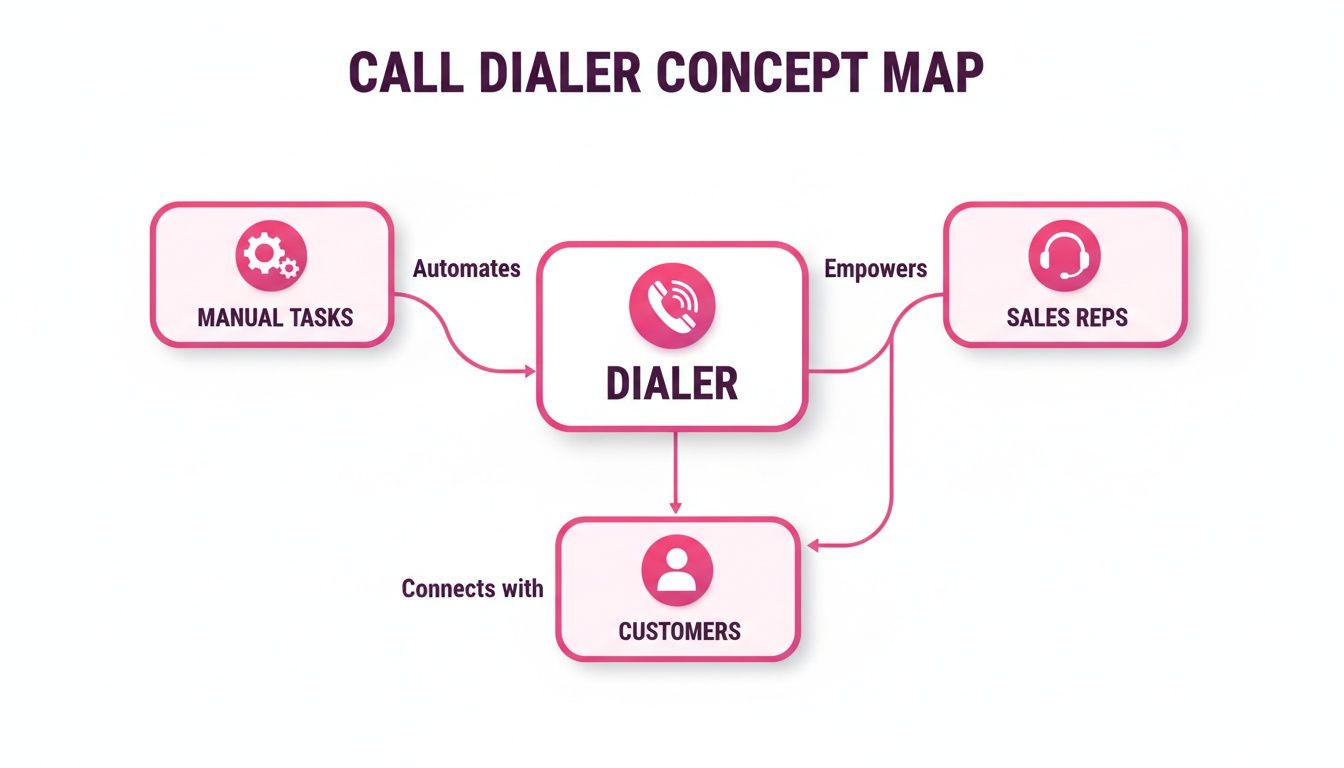
The dialer removes friction between reps and prospects, creating more opportunities for productive dialogue.
To help you decide, here is a comparison of the four main dialer types.
Call Dialer Comparison for B2B Sales Teams
This table breaks down the four main types of call dialers. It explains how they work, who they are best for, and their primary benefit. Use it to find the right fit for your sales workflow.
Dialer Type | How It Works | Best For | Primary Benefit |
|---|---|---|---|
Predictive Dialer | Dials multiple numbers per rep at once, using an algorithm to predict when a rep will be free. | High-volume, transactional sales teams aiming for maximum call quantity. | Efficiency. Reduces rep idle time by connecting them to live prospects continuously. |
Power Dialer | Dials one number after another for a single rep as soon as their previous call ends. | Teams needing a high call volume but with zero tolerance for dropped calls. | Speed. Keeps reps busy and ensures a rep is always available when a prospect answers. |
Progressive Dialer | Shows the rep a prospect's information before dialing. The rep initiates the call when ready. | Consultative, complex B2B sales where context and personalization are crucial. | Quality. Reps enter calls fully prepared, leading to more meaningful interactions. |
Click-to-Call | Turns phone numbers in a CRM or browser into clickable links, which the rep initiates manually. | Sales teams focused on targeted, low-volume outreach who want to eliminate dialing errors. | Simplicity. Removes the manual task of typing numbers and ensures every call is tracked. |
Ultimately, the best dialer is the one that aligns with your sales motion. A high-velocity team has different needs than a team focused on high-touch, enterprise deals.
Predictive Dialer: For Maximum Volume
A Predictive Dialer is designed for high-volume outreach. It dials several numbers at once for each available sales rep. An algorithm predicts when a rep will finish their current call, aiming to have a live person on the line the moment the rep is free.
Example workflow: An SDR team needs to contact thousands of leads for a high-turnover product. The goal is maximum dial volume. The predictive dialer continuously feeds live calls to reps, filtering out busy signals, voicemails, and disconnected numbers. This minimizes idle time.
There is a small risk of a "dropped call" if a prospect answers but no rep is free. This makes it best for quantity-focused campaigns where a tiny drop-off rate is an acceptable trade-off for efficiency gains.
Power Dialer: For Speed Without Dropped Calls
The Power Dialer offers more control than the predictive model. It dials the next number on the list as soon as a rep ends their previous call. It dials one number at a time per rep.
This approach eliminates dropped calls because the system only dials when a rep is confirmed to be free. This makes it a good choice for teams that need high call volume but cannot risk a prospect picking up to silence. It balances speed with a guaranteed human connection.
Progressive Dialer: For Prepared Conversations
A Progressive Dialer, also called a Preview Dialer, prioritizes preparation. Before dialing, the software displays the prospect's profile from your CRM on the rep's screen. This gives the rep time to review the contact's history and other key details.
Example workflow: For a complex B2B sale, a rep reviews a prospect's previous interactions and company information. The rep clicks to dial only when they are ready. This ensures each conversation is personalized and well-informed. You'll make fewer calls per hour than with a predictive or power dialer, but the quality of each interaction increases.
For consultative sales, where understanding a client's specific needs is critical, the Progressive Dialer is the best choice. It helps turn a cold call into a warm, informed conversation.
Click-to-Call: For Simple Integration
Click-to-Call is the most straightforward form of dialing automation. It integrates with your CRM or browser and turns phone numbers into clickable links. A sales rep clicks the number to place the call through their headset or softphone.
While it does not automatically dial through a list, it eliminates the manual task of typing or copy-pasting numbers. This is a good starting point for teams that do not need high-volume dialing but want to save time, reduce errors, and ensure all calls are logged in their CRM.
Essential Features of a Modern Sales Dialer
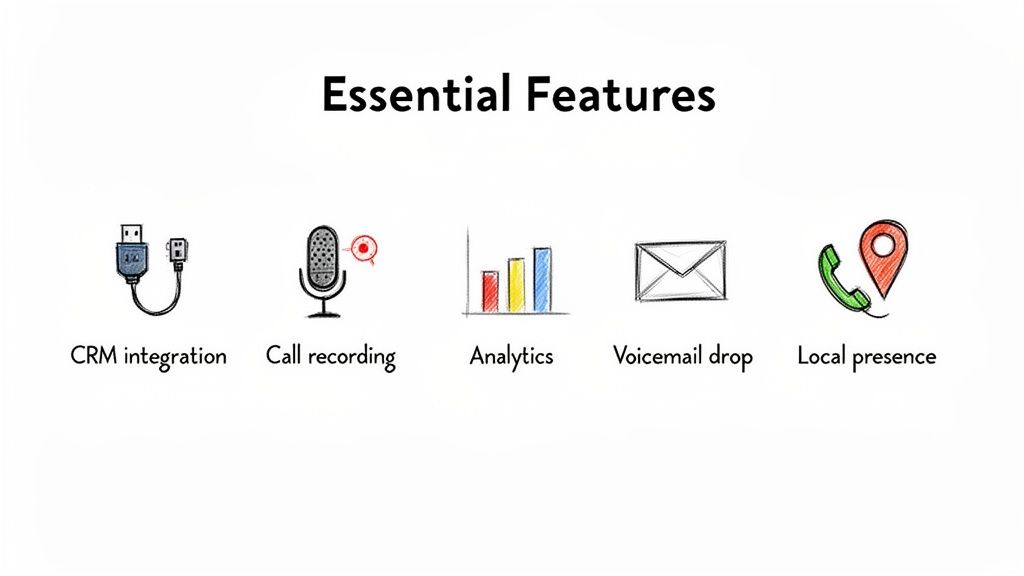
A good call dialer does more than dial numbers quickly. It should improve your team's daily workflow and results. When evaluating options, look for features that provide tangible benefits.
Seamless CRM Integration
A dialer that does not integrate with your CRM creates extra work. Seamless CRM integration connects your sales process by ensuring every call, note, and outcome is automatically logged to the correct contact.
What it is: The dialer’s ability to sync data with your CRM, such as Salesforce or HubSpot.
Why it matters: It eliminates manual data entry, which saves time and reduces errors. Reps see a prospect's full history before the call, and managers get accurate reports.
This connection is the foundation of an efficient workflow. For a deeper look at how this fits into a broader strategy, review our guide on improving sales prospecting techniques.
Call Recording and Analytics
You cannot improve what you do not measure. Call recording and analytics provide managers with the data needed for effective coaching. It turns every conversation into a training opportunity.
Modern dialers include dashboards that track key performance indicators (KPIs) like call volume, connection rates, and conversation duration. This data helps you identify which strategies are working and where your team may need support.
By reviewing call recordings, managers can identify specific words that lead to objections or phrases that result in a positive response. This evidence-based coaching is more effective than guessing.
Voicemail Drop
Leaving voicemails is a repetitive but necessary task. A voicemail drop feature allows reps to leave a pre-recorded message with a single click.
Example: A rep makes 100 calls and reaches voicemail 60 times. Manually leaving a message for each could take over an hour. With voicemail drop, the rep clicks a button, the system delivers the message, and the rep moves to the next call. This feature can save each team member several hours per week.
The use of dialers like the discador de chamada has reshaped B2B sales in Brazil. This aligns with data-driven tools like Samskit. The Brazilian communication platform market is projected to grow from USD 488.3 million to USD 1.8 billion by 2030. This growth is fueled by discadores preditivos that can achieve 300% higher contact rates. Voice calls are still involved in 60% of sales closes, making this efficiency critical. You can find more details in this report on Brazil's communication platform market.
Local Presence Dialing
People are often wary of calls from unknown, out-of-state numbers. Local Presence automatically displays a local phone number on the prospect's caller ID, no matter where your rep is located.
What it is: A feature that matches the caller ID's area code to the area code of the person being called.
Why it matters: It increases call answer rates. A familiar local number builds trust and makes it more likely that your prospect will pick up the phone.
How to Integrate a Dialer with Your CRM
A call dialer's full potential is realized when it is integrated with your Customer Relationship Management (CRM) system. Connecting these two platforms creates a single, efficient workflow for your sales team.
The goal of integration is to make your CRM the single source of truth. When your dialer and CRM are synced, every call, note, and outcome is logged automatically. This eliminates tedious manual data entry and reduces human error. Reps get the context they need for every conversation, and managers get accurate activity data.
The Benefits of a Unified System
Connecting your dialer to your CRM provides several advantages for a smarter sales operation.
Eliminates Manual Data Entry: Call activities, dispositions, and notes are logged automatically. This frees up reps to focus on selling. Manual data entry can consume up to 20% of a sales rep's time.
Provides Complete Customer Context: Reps can view a contact’s entire history before a call connects. This allows for more personalized and relevant conversations.
Delivers Accurate Performance Metrics: Managers get reliable data on call volume, connection rates, and conversation outcomes. This improves coaching, performance reviews, and sales forecasting.
An integrated system turns activity data into actionable intelligence. It ensures that information from every call contributes to a better understanding of your pipeline.
A Practical Checklist for a Smooth Integration
Follow this checklist to connect your dialer and CRM correctly from the start. This process turns two separate tools into one streamlined system.
1. Verify Native Compatibility
First, confirm that your chosen dialer has a native (built-in) integration with your CRM, whether it is Salesforce, HubSpot, or another platform. Native integrations are typically more stable and easier to set up than custom solutions. Check the dialer provider’s website for a list of supported CRMs.
2. Configure User Permissions and Access
Next, grant the dialer permission to access your CRM. This usually involves generating an API key or using a secure authentication method like OAuth. Be specific about what the dialer can do. For example, it should be able to create call logs and update contact records, but you may not want it to have permission to delete data.
3. Map Your Data Fields
This step is critical. Data mapping involves telling the dialer where to place information inside your CRM. You need to match fields from the dialer to the corresponding fields in your CRM.
Dialer Field: Call Outcome → CRM Field: Call Disposition
Dialer Field: Call Notes → CRM Field: Activity Notes
Dialer Field: Call Recording Link → CRM Field: Call Recording URL
Correct mapping ensures your CRM data remains clean, organized, and ready for accurate reporting. For more on this, see our guide on using a CRM for inside sales teams.
4. Define and Customize Call Dispositions
Standardize the outcomes reps select after each call. These dispositions—such as "Connected," "Left Voicemail," or "Meeting Booked"—should be identical in both the dialer and the CRM. This consistency is essential for accurate reporting and for triggering automated follow-up sequences.
5. Conduct Team Training and Testing
Finally, train your team on the new, integrated workflow. Show them how calls are logged automatically and where to find key information. Run a pilot test with a small group of reps first. This helps you resolve any issues before a full rollout and ensures everyone is confident with the new system.
Using Samskit to Capture Value from Every Call
A call dialer helps create more conversations. But what happens during those conversations? While a dialer focuses on the quantity of calls, Samskit is designed to capture and understand the quality of those interactions, ensuring no valuable insight is lost.
Think of your dialer as a tool that gets you in the room with more prospects. Samskit is the tool that records what happens in that room, identifies key moments, and logs the important details. Together, they create a complete end-to-end sales workflow.
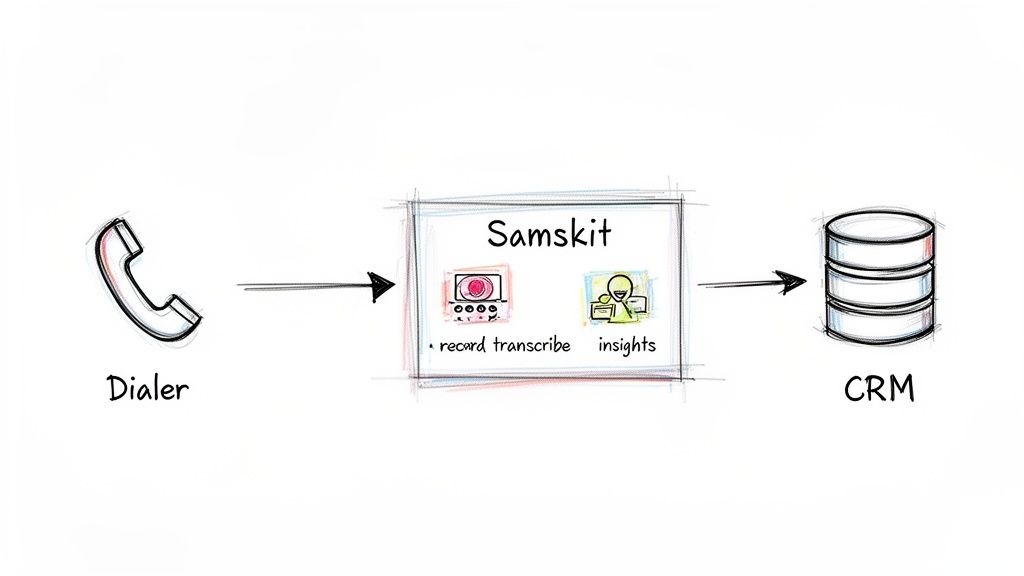
This combination closes a common data gap. The dialer initiates hundreds of conversations, and Samskit analyzes them, turning spoken words into structured data in your CRM.
Closing the Data Loop Automatically
When a rep connects with a prospect using their dialer, Samskit works in the background. It automatically joins the call to record and transcribe the conversation in real time. This creates a searchable record of the entire interaction.
After the call, Samskit’s analysis engine processes the transcript to identify and tag key moments, such as:
Customer Objections: Pinpointing the reasons for hesitation.
Competitor Mentions: Flagging when a rival is named.
Action Items: Capturing commitments and follow-up tasks.
Buying Signals: Identifying budget and timeline information.
This all happens automatically. Your team gets actionable insights without manually reviewing recordings or taking notes.
This process turns unstructured conversation into structured data. Samskit identifies critical signals in a call and organizes them, making it easy to understand a deal's status.
A Streamlined Post-Call Workflow in Action
Here is a step-by-step example of the workflow.
Initiate Calls with the Dialer: A rep uses a call dialer to efficiently connect with prospects.
Samskit Captures the Conversation: For each connected call, Samskit automatically records, transcribes, and analyzes what is said. The rep can focus 100% on the conversation, not on note-taking.
Automated Summaries & CRM Updates: After the call, Samskit generates a concise summary, highlighting key topics, action items, and customer pain points.
Sync to CRM: This summary, along with tagged insights and a link to the recording, is instantly pushed to the correct record in your CRM. The data is accurate and complete, requiring zero manual work from the rep.
This process allows the sales rep to immediately move to the next call, knowing the previous conversation has been perfectly documented. It removes the administrative burden that slows reps down and helps them maintain momentum.
Choosing the Right Dialer for Your Sales Team
Selecting the right discador de chamada can be a straightforward process with a clear evaluation framework. The goal is to find a tool that fits your team, processes, and long-term goals. Focus on practical functionality that will impact your team's adoption and your return on investment.
Your Evaluation Checklist
Use this checklist to measure every tool against the same practical standards.
CRM Compatibility: Does the dialer offer a stable, native integration with your CRM? A poor connection creates more work.
Scalability: How easily can you add or remove users? Avoid rigid contracts that penalize you for growth or restructuring.
Ease of Use: Is the interface intuitive? If the tool is difficult to use, your team will not adopt it, resulting in a wasted investment.
Transparent Pricing: Are the costs clear? Ask for a full breakdown of all potential charges to avoid hidden fees for setup, support, or extra features.
Key Questions to Ask Vendors
Use these questions to uncover potential issues before you commit.
Onboarding and Training: What does your implementation process involve? What training do you provide to get my team started?
Support and Reliability: What is your guaranteed uptime? What is your standard support process when issues arise?
Data Security: How do you protect our customer data? Describe your security and privacy measures.
A good vendor should act as a partner. They should be invested in your success and offer guidance on best practices for using their discador de chamada to meet your sales goals.
The contact center industry in Brazil is moving to the cloud. The global predictive dialer market is expected to reach USD 3.2 billion by 2033, with some Brazilian companies reporting sales conversion increases of 50-70% after implementation. This shows the importance of choosing a tool that dials efficiently and integrates well—just as Samskit simplifies post-meeting CRM updates. You can learn more about the growth of the predictive dialer market.
A Clear Implementation Roadmap
A well-planned implementation is key to a smooth rollout.
Set Realistic KPIs: Define what success looks like before you begin. Are you aiming for more calls per rep, higher connection rates, or more meetings booked?
Prepare Your Contact Data: Clean your contact lists before importing them. Accurate and complete data is essential for a dialer to run effectively.
Conduct Effective Team Training: Go beyond showing features. Use role-playing to demonstrate how the dialer fits into their daily workflow and makes their job easier.
Establish a Feedback Loop: Schedule regular check-ins with the team during the first few weeks. Listen to their feedback to identify and address any friction points quickly.
Frequently Asked Questions
Here are answers to some common questions about using a discador de chamada.
Can a Dialer Work for a Small Sales Team?
Yes. While predictive dialers are best for large call centers, other types like progressive or click-to-call dialers are beneficial for small teams. Even for a team of two or three, they eliminate wasted time and errors from manual dialing. The key is to choose a dialer that fits your sales process, not your team size.
Will a Predictive Dialer Annoy Our Prospects?
This is a valid concern related to "dropped calls," which occur when a prospect answers to silence. Modern predictive dialers use algorithms to keep the call abandonment rate very low, often under 2%. However, for B2B sales where relationships are important, a power or progressive dialer is often a safer choice. They ensure a rep is always available when the call connects.
Is It Difficult to Set Up a Call Dialer?
No. Most modern dialers are cloud-based and user-friendly. The most important step is integrating it with your CRM by ensuring the data fields are mapped correctly. A good provider will offer a simple, one-click integration with major CRMs and provide clear instructions or support during setup.
A modern discador de chamada should simplify your work. A good one can be set up by a sales manager without IT assistance, getting your team dialing quickly.
How Much Do Sales Dialers Cost?
Most dialers use a per-user, per-month subscription model. The price varies depending on the dialer type and features.
Basic Plans: Typically include click-to-call and power dialing.
Advanced Plans: Often include predictive dialing, detailed analytics, and local presence features.
Ask for a clear breakdown of all costs. You want to avoid unexpected fees for setup, support, or call minutes. The value comes from the return on investment as your team spends more time talking to prospects.
By handling post-call administrative tasks, Samskit ensures you get the full value from every conversation your dialer creates. Turn spoken words into reliable CRM data and clear, actionable next steps. Discover how Samskit can help you.